TareWise workflow
How TareWise turns current ingredient costs into consistent quotes.
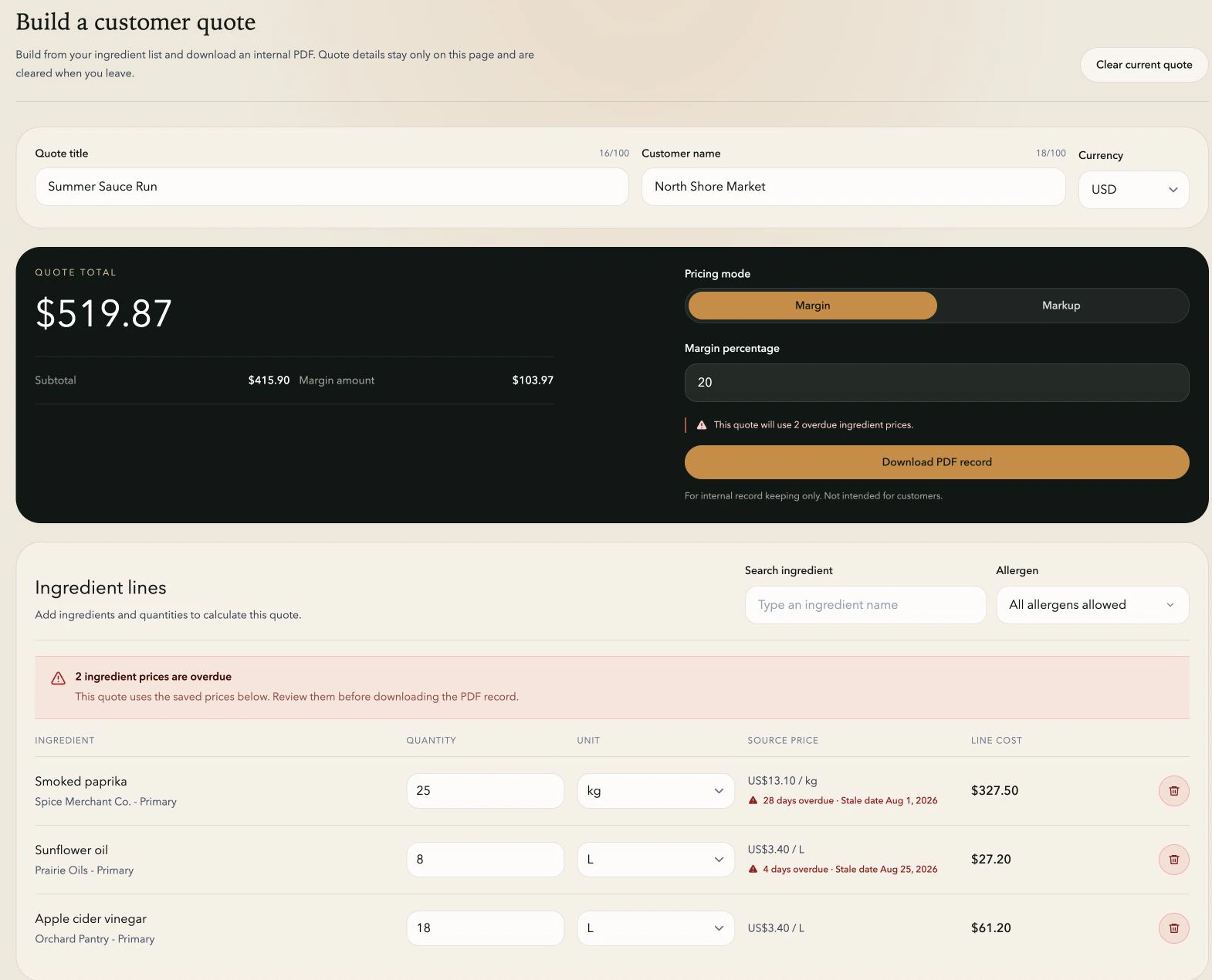
Sales builds from the prices purchasing already maintains, with compatible-unit conversion, overdue-price warnings, and margin or markup in one calculation.
From current cost to quote
Give sales a faster path to a number they can stand behind.
Client-side quotes built from your ingredient price list and the quantities you select.
Compatible-unit conversion, USD/CAD/EUR/GBP quote currencies, overdue-price warnings, and margin or markup.
A downloadable PDF with ingredient lines, quantities, pricing method, subtotal, and total.
Shared ingredient costs
Start every quote from the list purchasing maintains.
TareWise connects the quote builder to the same ingredient list purchasing uses for supplier, tier, item code, price, currency, unit, and review date.
If a request uses canola oil, flour, and salt, sales sees whether each price is current, due soon, or overdue as soon as the ingredients enter the quote.
- Purchasing maintains supplier prices and review dates.
- Sales chooses quantities, quote currency, and margin or markup.
- TareWise keeps both parts visible in the same calculation.
Quote builder
Build the calculation without rekeying supplier costs.
Each quote line starts with an ingredient from the shared list. Sales enters the quantity, and TareWise converts compatible units such as litres to millilitres, kilograms to pounds, or dozens to individual units.
Weight, volume, and count remain separate because conversions between those families require business-specific assumptions. The supplier unit and price stay visible while TareWise handles the compatible unit math.
Overdue-price warnings
See stale inputs inside the quote, not after it.
TareWise flags overdue ingredient prices in the quote total and on the affected lines. Sales can see exactly which costs need confirmation before the calculation moves forward.
The saved price remains visible until purchasing updates it, giving the team a clear source cost to confirm before the quote moves forward.
Pricing controls
Keep currency, margin, and markup explicit.
Quotes can use USD, CAD, EUR, or GBP. TareWise converts ingredient lines when the required FX rate is available, shows an error when it is not, and keeps the original supplier currency visible.
Sales chooses margin or markup in the builder, and the selected method stays labelled in the quote and PDF. The subtotal, adjustment, and total update together.
- Choose margin or markup directly in the quote builder.
- See the ingredient-cost subtotal, adjustment, and total together.
- Carry the selected pricing method into the internal PDF.
Internal record
Download a clear record of the quote calculation.
The PDF records the ingredient lines, quantities, supplier tiers, prices, ingredient-cost subtotal, pricing method, and total.
Quotes are held in the browser and clear when you leave the builder. Download the PDF first if the team needs to retain the calculation.
Ready for the next quote
Keep ingredient costs ready when sales needs them.
Keep supplier prices, review dates, and units in one shared workspace. Sales can build the quote from that list and download a PDF for the team. Quotes are cleared when you leave the builder, and recipes never need to be stored in TareWise.
Start your free PilotFAQ
Common questions.
Does TareWise save completed quotes?
No. Quote details are held in the browser and cleared when you leave the builder. Download the PDF first if the team needs to keep the calculation.
Can a quote use different units or currencies from the ingredient record?
Yes. TareWise converts within weight, volume, or count unit families and supports USD, CAD, EUR, and GBP quote currencies when the necessary FX rate is available.
What does the TareWise quote total represent?
The total applies the selected margin or markup to the ingredient costs in the quote. It gives the team a consistent ingredient-cost figure to carry into its pricing process.
Related workflows