TareWise workflow
How TareWise keeps ingredient costs current.
A shared supplier price list gives purchasing a clear review queue and gives sales current costs when it is time to quote.
From purchasing to sales
Keep the cost behind every ingredient easy to trust.
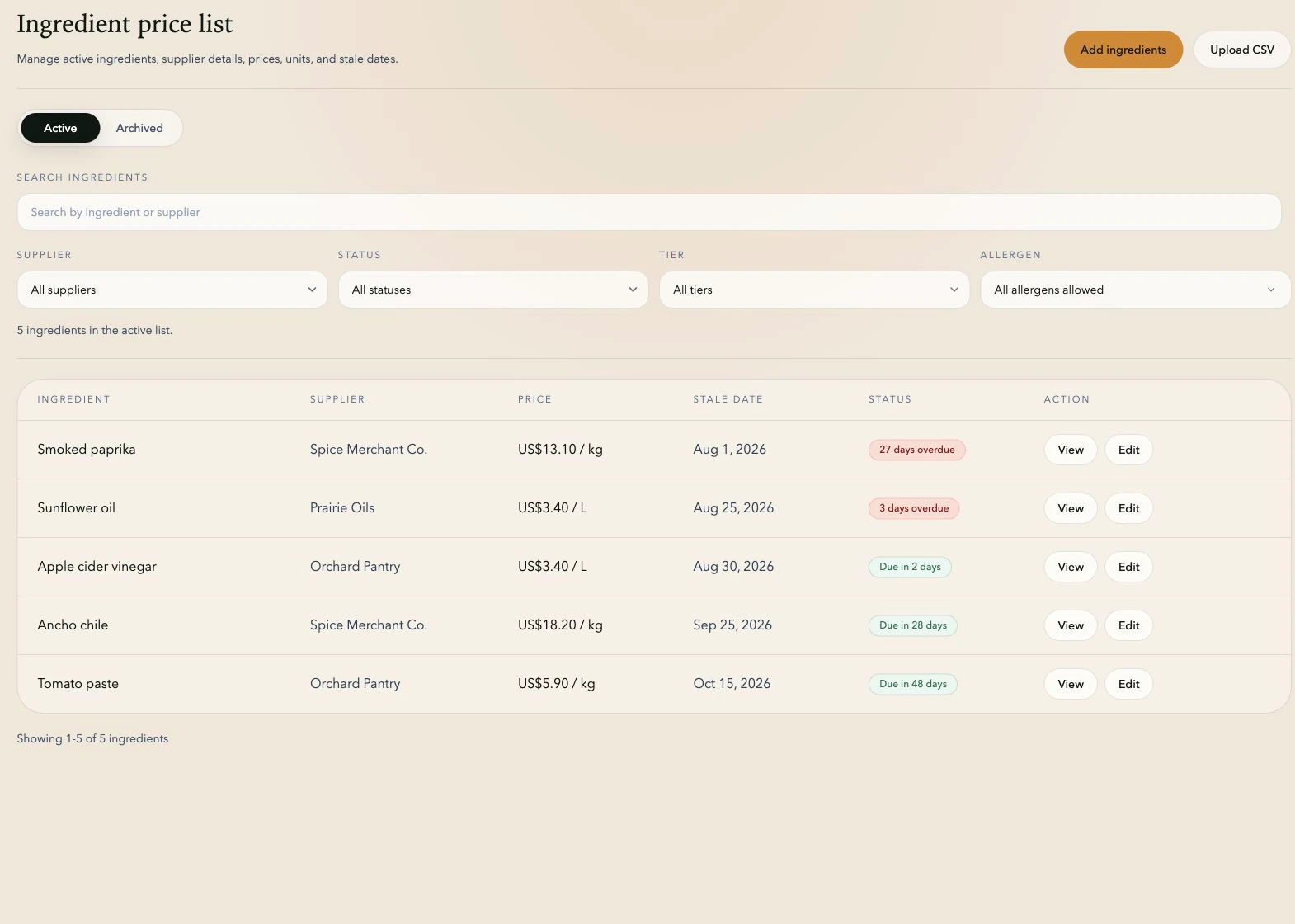
A shared ingredient price list with supplier, tier, item code, currency, unit, allergens, and review date.
CSV import, list filters, overdue-price queues, price history, and compatible-unit conversion.
Current ingredient prices that sales can use in the quote builder.
Shared ingredient list
Keep every supplier price easy to verify.
TareWise keeps the ingredient, supplier, price, currency, purchasing unit, and review date together. Supplier tier and item code make primary and alternate sources easy to distinguish.
Each supplier option remains a separate record. Purchasing can see exactly which source a price belongs to, and sales does not have to guess which cost to use.
- Core fields: ingredient, supplier, price, currency, purchasing unit, and review date.
- Sourcing details: primary, secondary, or tertiary tier and the supplier item code.
- Useful filters: allergen tags, supplier, tier, and review status.
Units and currencies
Use supplier units without adding manual quote math.
TareWise keeps each price in the supplier’s original unit and converts compatible quantities in the quote builder. A CAD 7.40 per litre oil price can support a 7,500 mL quote line while the original CAD-per-litre price remains visible.
Weight, volume, and count stay in separate unit families, keeping every conversion consistent and easy to trace back to the saved supplier price.
- Supported quote currencies: USD, CAD, EUR, and GBP.
- Cross-currency lines require an available FX rate. TareWise shows an error rather than estimating a missing rate.
- Keep the entered supplier currency on the ingredient record even when a quote uses another currency.
Review work queue
Turn review dates into a clear list of what needs attention.
Every ingredient can have its own review date, so purchasing can match the schedule to the way the business buys rather than forcing every price into one blanket cycle.
The dashboard separates overdue, due-soon, and current prices. Filters by supplier, tier, and status make it easy to work through a focused group before sales needs it.
- See overdue and upcoming reviews in one work queue.
- Filter the list by supplier, tier, allergen, or review status.
- Surface overdue prices again when they are selected for a quote.
Price history
Keep the history behind the current price.
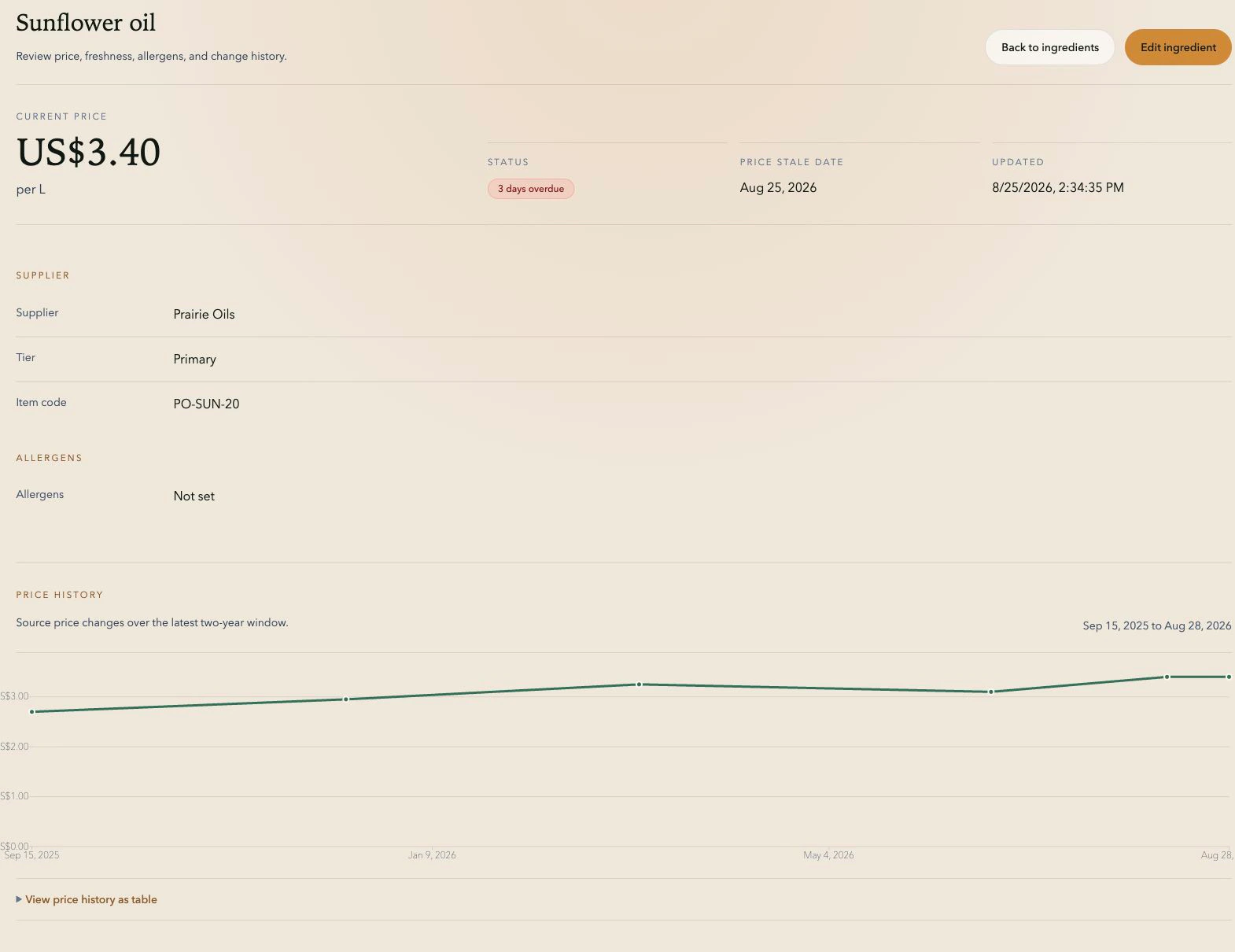
When canola oil moves from CAD 7.40 to CAD 8.05 per litre, TareWise keeps the dated price history on the ingredient page. Changes to supplier, unit, currency, tier, and item code are recorded there too.
Purchasing can see what changed, when it changed, and which supplier details moved with the price—useful context when sales asks why a quote has shifted.
CSV import
Bring the ingredient list you already have.
Upload a CSV and map the existing columns to TareWise fields. The import validates currencies, units, tiers, allergens, and required values before anything is added to the shared list.
Rows with missing or invalid data stay visible for correction, making it easier to move from the current spreadsheet without recreating every ingredient by hand.
Purchasing and sales
Give both teams the same ingredient costs.
Sales selects ingredients from the list purchasing maintains and enters the required quantities in compatible units. Supplier price, tier, currency, and review status stay attached to each line.
The quote builder carries those verified inputs into the calculation and produces a PDF record of the ingredients, quantities, costs, pricing method, and total.
Ready for the next quote
Keep ingredient costs ready when sales needs them.
Keep supplier prices, review dates, and units in one shared workspace. Sales can build the quote from that list and download a PDF for the team. Quotes are cleared when you leave the builder, and recipes never need to be stored in TareWise.
Start your free PilotFAQ
Common questions.
What does TareWise keep with each ingredient price?
Each record includes the ingredient, supplier, price, currency, purchasing unit, and review date. Supplier tier, item code, and allergen tags add detail for sourcing, filtering, and quoting.
Can TareWise compare weight and volume ingredient prices?
TareWise converts compatible units within weight, volume, or count families. Weight and volume remain separate because converting between them requires an ingredient-specific density.
How does TareWise support the handoff from purchasing to sales?
Purchasing maintains supplier prices, review dates, and sourcing details in one shared list. Sales uses those same records in the quote builder, with freshness warnings and compatible-unit conversion carried into the calculation.